
UniUni is a newer, fast-growing carrier that can offer meaningful cost savings, typically with longer transit times than major carriers. We can help you decide where it fits your shipping needs and adjust its use as you monitor performance.
What Is UniUni?
UniUni focuses on last-mile DTC delivery for small to medium-sized parcels. It uses a flexible, on-demand driver model, similar to Uber or DoorDash, to deliver packages from centralized hubs.
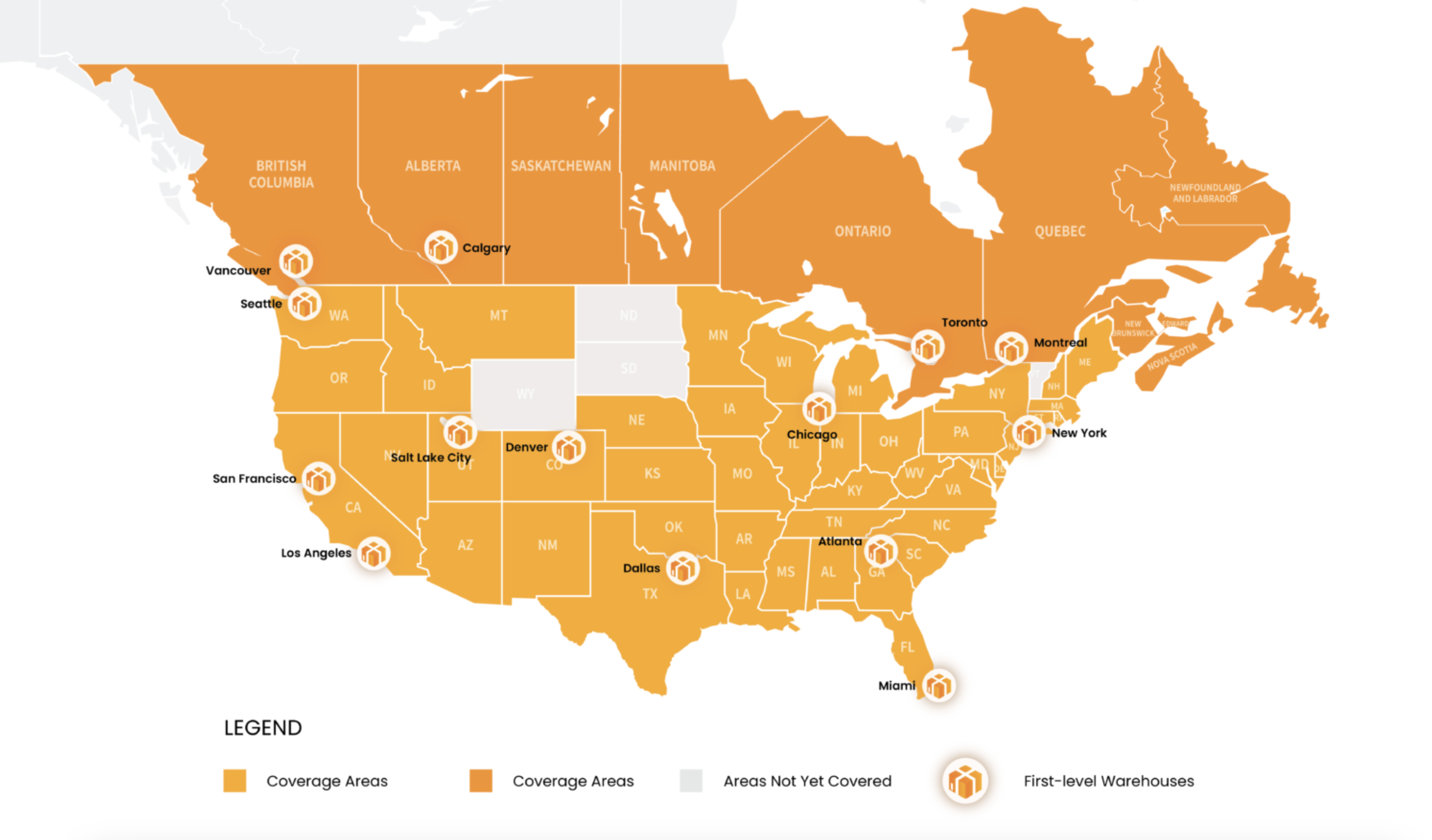
Packages are collected at local hubs, then handed to a network of independent drivers for final delivery. UniUni uses AI-powered routing and covers 80% of Canada and 65% of the U.S.
As traditional carrier rates have climbed over the last few years, this model allows UniUni to price differently.
UniUni's coverage map, as of 02/23/2026:
When UniUni May Be a Good Fit
UniUni tends to work best when your priority is cost savings and you can tolerate longer transit times. Potential uses include:
- Budget-friendly shipping: Delivery speed is not your primary promise.
- Lower-AOV orders: Reducing costs matters more than 2-day delivery.
- Seasonal promotions: You want a cheaper option temporarily.
- Selective shipping rules: You want to use UniUni only for certain zones, weights, or package types.
As with other major carriers, your customers can track packages shipped with UniUni.
For brands looking to reduce fulfillment and shipping costs in 2026, UniUni can be a strong fit in the right scenarios. Because we can turn it on or off for your account at any time, we highly recommend testing a few use cases in Q1 to Q2, when the risk is low. Your Account Manager can help you monitor performance and adjust when and how UniUni is used.
Tradeoffs to Expect
UniUni's lower costs come with lower service and support levels than major carriers. When shipping through UniUni, expect these tradeoffs:
- Slower transit: Delivery is slower than USPS or UPS in many lanes. In one example we have seen, a shipment from PA to its destination took approximately 6 days via UniUni, compared with the approximately 2 to 3 days typical for USPS or UPS on similar lanes.
- Less consistent delivery: The delivery experience is less consistent than with major carriers' networks.
- Tracking lags: UniUni typically has fewer in-network scan events than major carriers, so tracking may update less frequently. A package can appear stuck even while it is moving through the network.
- Different support flow: Support and claims are not as streamlined as they are with major carriers.
Accountability and Claims
UniUni is a cost-saving carrier option, but it does not offer the same service levels as major carriers. If you enable UniUni, Nice Fulfillment is not responsible for:
- Transit time performance: Delays, late deliveries, or missed delivery windows.
- Carrier exceptions or disruptions: Weather, routing issues, facility backlogs, and other disruptions.
- Packages lost in transit: Keep in mind that fewer in-network scans can make packages appear stuck or lost even when they are moving through the network.
We can file claims and escalations with UniUni on your behalf, but we cannot guarantee a successful outcome.
How to Activate UniUni
UniUni is not enabled by default. To use it, you must request activation for your specific account and specify when the service should apply.
- Tell your Account Manager you want UniUni activated for your account.
- We will confirm that you understand the tradeoffs, including speed and support responsibilities.
- We will enable UniUni and confirm which shipments it should apply to.
How to Control When UniUni Is Used
We can make UniUni broadly available or limit it to specific use cases. We can also turn it on or off at any time for seasonal or temporary use.
| Usage option | How it works |
|---|---|
| Always available, broadest use | UniUni appears as a carrier option in “Cheapest Ever” rate shopping for packages going to eligible delivery areas. |
| Seasonal or temporary | We can turn UniUni on or off at any time for seasonal demand, promotional campaigns, or limited-time testing. |
| Rule-based | We can set rules to use UniUni only for specific shipments. |
Examples of rules we can set up include using UniUni only:
- For certain zones or regions.
- Under a specific order value.
- For product exchanges.
- For non-urgent service tiers.
- Under or over a specific weight threshold.
Tell us what you want to prioritize, such as the cheapest label, protecting reviews, or reducing WISMO tickets. We can suggest the best rules and routes to apply.
Frequently Asked Questions
Will shipping through UniUni be cheaper than with a traditional carrier?
Often, yes. Cost savings are the main reason brands use UniUni, but those savings come with slower and less predictable transit than major carriers.
Will my customers be able to track UniUni packages?
Yes. UniUni provides tracking for customers and brands on its package tracking website. UniUni uses fewer scanning touchpoints than traditional carriers, so tracking updates may lag.
Can I turn UniUni off later?
Yes. We can enable or disable UniUni at the account level at any time.
What if a package is delayed or lost with UniUni?
Your team can manage support tickets and claims directly with UniUni. If a package appears genuinely stuck or lost, reship sooner rather than waiting for a claim to be resolved. This is usually the fastest way to protect the customer experience.
Timelines in this article follow our service level agreement. Questions? Email support@nicecommerce.com.